
Optimized for iPhone Duo
Photos
Apple
Duo Features
How this app behaves on Duo
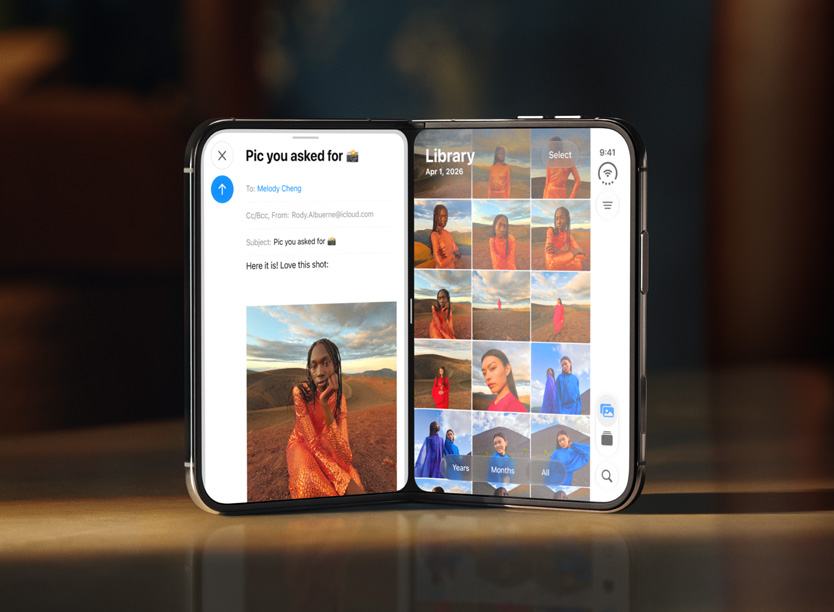
Photos on iPhone Duo can sit beside Mail in Split View on the inner display, so you browse the library on one half and drag a photo onto a draft on the other. The library itself is still an adaptive grid: compact width stays dense, regular width adds the extra columns the inner canvas can hold.
Copyable developer patterns
01
Split View library beside a draftApple’s pairing is system Split View plus drag, not a custom two-window Photos UI. Expose drag payloads so another app can receive items on the other half.
02
Adaptive grid columnsKeep a dense browser in compact width and add columns when horizontalSizeClass is regular. Do not lock the library to a single phone column on the inner canvas.
Screenshots
Closed, open, and folded — only stills Apple has published.
FAQ
How does Photos work on iPhone Duo?
Photos on iPhone Duo can sit beside Mail in Split View on the inner display, with an adaptive library grid that gains columns in regular width. Apple shows browse-and-drag into a draft, not a fold-aware Photos layout.
Is the Photos and Mail pairing a custom Photos windowing API?
No. Apple’s demo is system Split View plus drag payloads. Apps that resize with size classes and expose drags can participate in the same pairing.
Last updated