
Optimized for iPhone Duo
Slack
Slack Technologies, Inc.
Duo Features
How this app behaves on Duo
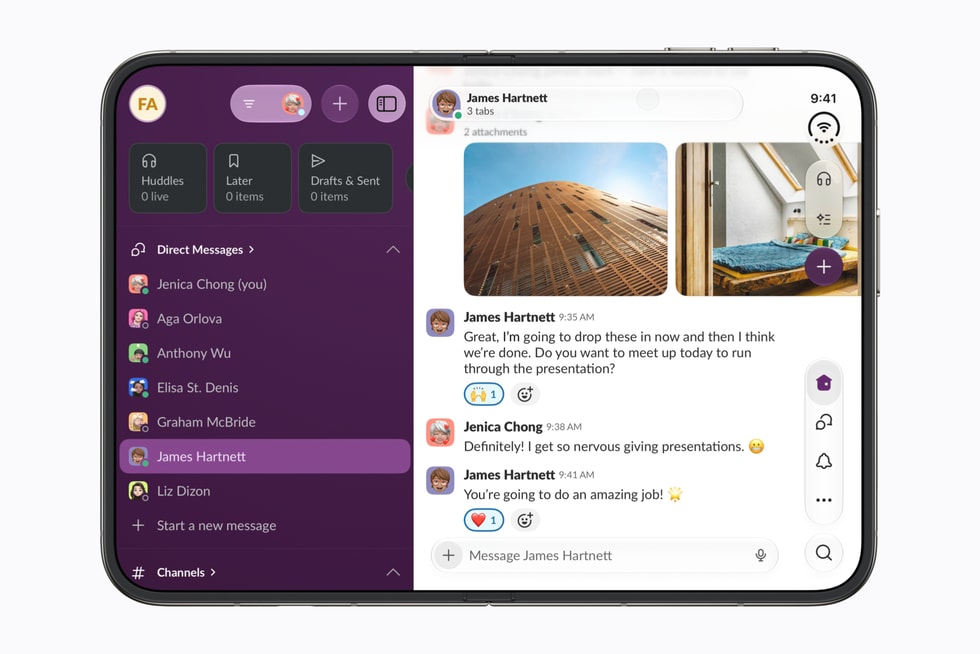
Slack on iPhone Duo uses the inner display as a regular-width workspace: sidebar plus conversation instead of a single compact column. That is the same size-class pattern information-dense apps already use on iPad; when Duo is closed, Slack still has to collapse to one column on the outer display.
Copyable developer patterns
01
Regular-width workspace columnsWhen horizontalSizeClass is regular, show the channel list beside the conversation. Apple’s Newsroom still shows Slack as a sidebar-plus-thread canvas, not a fold split.
02
Collapse the sidebar in compact widthOn the outer display, compact width should stack to a single column. Do not keep the inner-display two-pane chrome when the scene is compact.
03
Size class, not ArrangementViewApple did not document Slack-specific Duo APIs. Drive the workspace from size class. Do not tag Slack as ArrangementView, Split View, or fold-aware from this showcase.
Screenshots
Closed, open, and folded — only stills Apple has published.
FAQ
What layout pattern does Slack use on iPhone Duo?
Slack uses a regular-width inner-display workspace — sidebar plus conversation — and collapses to one column in compact width. Apple’s Newsroom shows that canvas, not a fold-aware or ArrangementView layout.
Does Slack use ArrangementView on iPhone Duo?
No public source shows Slack using ArrangementView. The cited behavior is a regular-width size-class workspace on the inner display.
How does Slack behave when iPhone Duo is closed?
Closed, Slack still has to collapse to a single compact column on the outer display. The two-pane workspace is the regular-width inner-display layout, not a second app.
Last updated